Hospital software that keeps working when the internet doesn’t
Adhrit HMS runs OPD, IPD, billing, lab and your cashbook on the computer at your own counter. It was built inside a working nursing home in Madhya Pradesh, and it is still in use there every day.
- No internet needed at the counter
- Records stay on your computer
- Daily backup to your Google Drive
- Built in a real hospitalEvery screen was shaped by a working reception counter.
- Your data stays yoursOn your computer and your own Google Drive.
- One yearly priceNo charge per bill, per patient or per doctor.
- Updates includedNew versions arrive inside the software, free, for your whole term.
Everything that happens at a nursing home counter
From the first registration of the morning to the last discharge bill of the night, and the cashbook that has to match at closing.
OPD registration
Register a patient, pick the doctor, take the fee and print a slip with a barcode on one screen. Returning patients come back with their full history.
IPD admissions
Admit to a ward and bed, take an advance and see every admitted patient in one list with the doctor and admission date.
IPD billing & discharge
Add charges through the stay, take part payments, apply a discount and print one clear discharge bill with the balance worked out.
Lab & radiology
Bill pathology and radiology tests from your own price list, for admitted patients, OPD patients or walk-ins.
Outside patients
Patients who come only for a test or a service are billed and tracked separately, without cluttering your OPD register.
Cashbook
Every rupee in and out, split by cash and UPI, filtered by date, department or patient, and exported to Excel or PDF.
Your letterhead
Print on pre-printed letterhead or let the software print your header, footer and watermark on plain paper.
Staff logins
Separate logins for the owner, manager and reception. Each sees only what their job needs, and every entry records who made it.
Real screens, with a sample hospital filled in
These are taken from the software as it ships. The hospital, doctors and patients are made up.
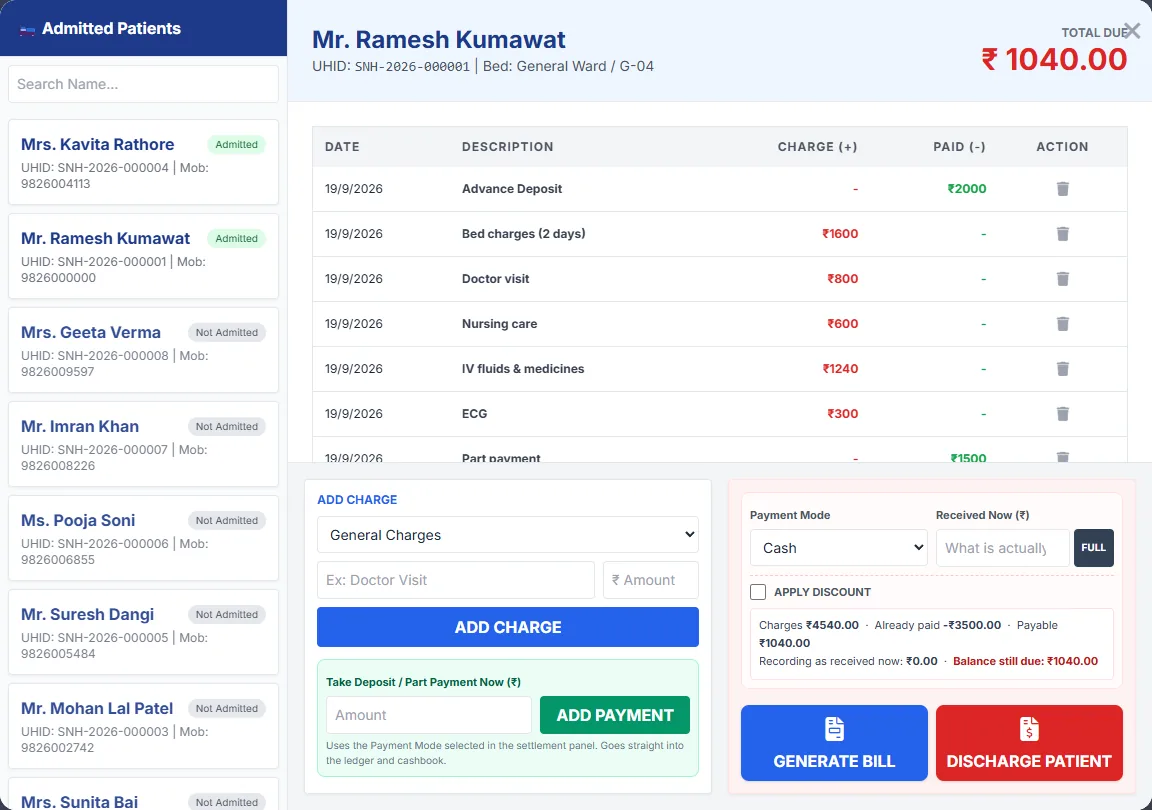
The whole stay on one screen
Open an admitted patient and everything is there: the advance, each charge as it was added, every part payment, and what is still due.
- Charges as they happen — bed, doctor visits, nursing, medicines, procedures.
- Part payments in cash or UPI, each one landing in the cashbook straight away.
- Discount and final settlement with the balance worked out before you print.
- One discharge bill that adds up the entire stay.
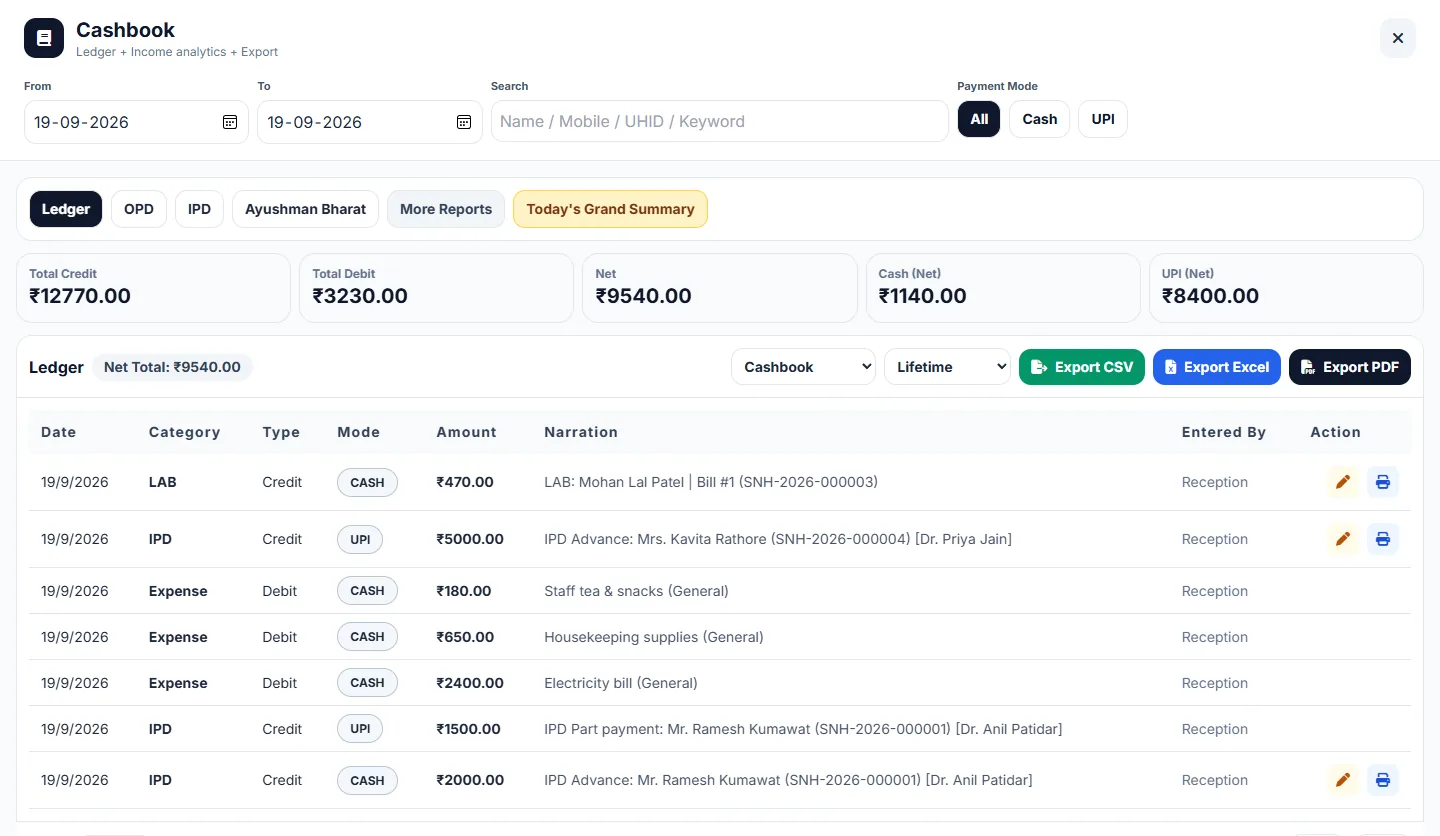
A cashbook that matches the drawer
Every OPD fee, IPD payment, lab bill and expense is written to the cashbook as it happens. Nobody types it in twice.
- Filter by date — today, last 7 or 30 days, this year, any range you choose.
- Cash and UPI totals kept apart, so closing the day is a two-minute job.
- Separate views for OPD, IPD and Ayushman Bharat patients.
- Export to Excel, CSV or PDF for your accountant.
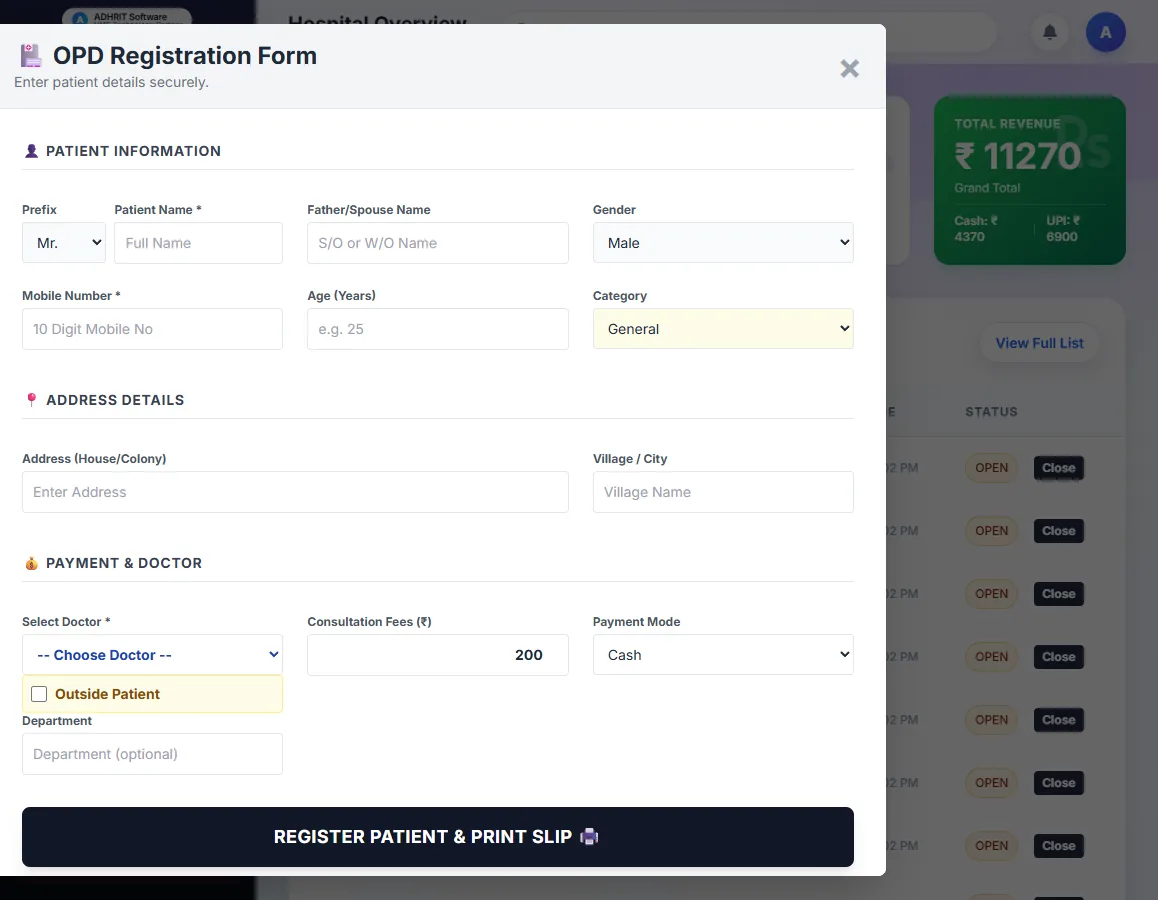
Registration while the queue waits
One form for the patient, the doctor and the fee. Press save and the slip prints.
- UHID made automatically from your hospital’s initials.
- Returning patients found by name, mobile number or UHID.
- General or Ayushman Bharat category recorded at registration.
- A slip with a barcode and space for vitals.
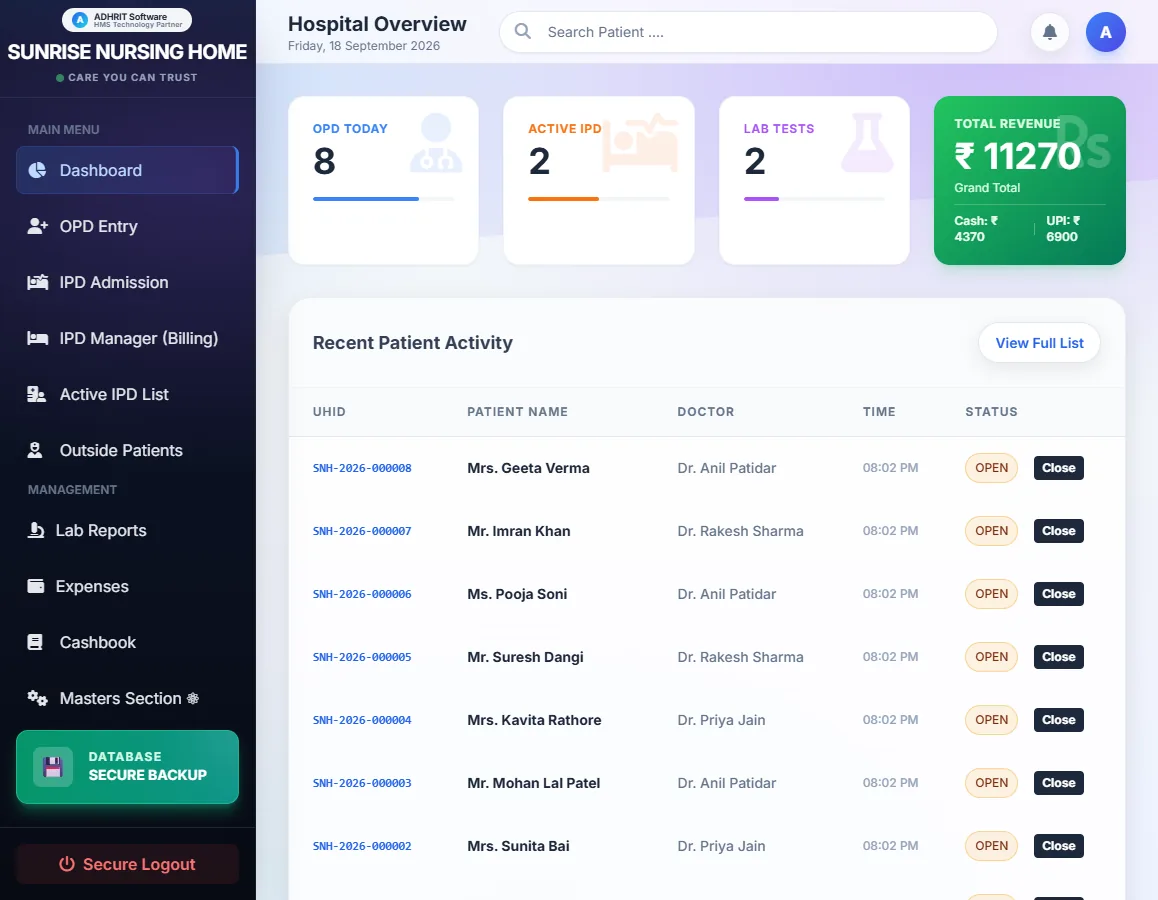
The day at a glance
Open the software and the day is already counted: OPD patients, admissions, lab tests and what has been collected.
- Today’s collection split into cash and UPI.
- Active admissions one click away.
- Recent patients with their visit history.
From download to licensed in one sitting
No licence key arrives by post or email, because there isn’t one to send.
Download the trial
Install it on the computer at your reception counter. It takes about two minutes.
Use it for a week
Register real patients, admit, bill and print. See whether it fits how your staff work.
Buy on this website
Pick 1, 3 or 5 years and pay by UPI, card or net banking. Choose your email and password as you pay.
Sign in to activate
In the software, click Activate and sign in. Everything you entered during the trial stays.
One price a year. Nothing per bill.
Every feature, updates and support are in the price. There is no separate maintenance charge.
Adhrit HMS Solo
- OPD, IPD, discharge billing, lab and outside patients
- Cashbook with filters and Excel / PDF export
- Unlimited patients, bills, doctors and services
- Staff logins with roles
- Daily backup to your own Google Drive
- Free updates and support for your whole term
| 1 year | ₹11,999 |
|---|---|
| 3 years | ₹33,998₹10,000 + ₹11,999 + ₹11,999 |
| 5 years | ₹51,997₹9,000 + ₹9,500 + ₹10,500 + ₹10,999 + ₹11,999 |
Multi-year plans are paid once, at the total shown, and your rate is fixed for the whole term even if our list price goes up. The launch price applies to a one-year purchase. Prices are in Indian rupees.
Adhrit HMS Professional
- Everything in Solo
- Several counters working together on one network
- Pharmacy: stock, purchases and medicine sales
- Bills and reports sent to patients on WhatsApp
- Priority support
Not on sale yet. Pre-order and we will hold the launch price for you and call you as soon as it is ready.
Pay by UPI, debit or credit card, or net banking, through Razorpay. By buying you agree to our Terms of Service, Licence Agreement and Refund Policy.
How we differ from a typical cloud HMS
Cloud software suits some hospitals better, and we say which ones. For a single-location nursing home, this is the difference.
| Adhrit HMS Solo | Typical cloud HMS | |
|---|---|---|
| Internet goes down | Counter keeps working | Counter stops until it is back |
| Where patient records live | Your computer and your Google Drive | The vendor’s servers |
| Yearly cost for a small hospital | ₹9,000 to ₹11,999 | Often ₹24,000 to ₹96,000 |
| Charges per bill or per patient | None | Common |
| If you stop paying | Your records stay readable and exportable | Access usually ends |
| Speed at the counter | Runs at the speed of your computer | Depends on the connection |
| Open from home on your phone | Not in Solo | Usually yes |
Try it on your own counter for 7 days
Install it on the computer at reception and use it with real patients. Nothing to pay and no card needed. If you buy, everything you entered carries over.
Downloading in Chrome
Chrome may say the file isn’t commonly downloaded. Click the download icon at the top right, then Keep (or the three dots → Download anyway).
Downloading in Edge
Edge may show the same message. Click the three dots next to the file → Keep → Show more → Keep anyway.
These messages appear for any new software until enough people have downloaded it. Prefer help? Ask us and we will install it with you on a call.
Windows may warn that the publisher is unknown. That happens with software from new publishers that have not yet bought a code-signing certificate, and it will go away as more people install it. Click More info and then Run anyway. By installing, you accept the Licence Agreement.
What hospital owners ask us
Does Adhrit HMS need the internet to work?
No. Registration, billing, admissions, lab bills, the cashbook and printing all run on the computer at your counter. When the line goes down in the middle of OPD, nothing at the counter changes. The internet is only used for three things, and all of them can wait: activating your licence once, the daily backup to your Google Drive, and checking for updates.
Where are our patient records kept?
On the computer the software is installed on, and in your own Google Drive if you switch on backup. Not on our servers. We never receive your patient data, and we could not open it if we wanted to.
What happens if the computer breaks or is stolen?
Install Adhrit HMS on the new computer, connect the same Google account and restore the latest backup. Backups run once a day on their own. Your licence moves with you: you can take it off the old computer yourself, or we do it for you if that computer no longer switches on.
How many people can use it?
Solo runs on one computer, and everyone who works on that computer gets their own login: the owner, a manager, the reception staff. Each role sees only what it should, and every bill records who made it. If you need several counters on a network, that is the Professional edition, which is coming soon.
Will it print on our own letterhead?
Yes, in two ways. If you have pre-printed letterhead paper, it prints only the patient details in the space below your header. If you use plain paper, it prints your full hospital header, footer and a watermark itself. The margin is adjustable, so it lines up with the paper you already have.
How do I buy, and how does the licence reach me?
Pay on this website by UPI, card or net banking. You choose an email and password while paying. Then open the software, click Activate and sign in with that same email and password. That is all: there is no licence key to copy, type or lose.
What happens when the licence period ends?
The software stops taking new entries, but every record you created stays yours. You can still open, search, print and export all of it. We do not hold a hospital’s records to ransom. Renew and you carry on exactly where you left off.
What does the free trial include?
Everything in Solo, for 7 days, with limits that let you run a real day at your counter: 30 OPD registrations, 5 IPD admissions, 20 lab bills, 3 doctors, 10 services and 3 exports. Nothing to pay and no card needed.
Can you move our data from the software we use now?
Often, yes, depending on what your current software can export. Tell us what you use when you book a demo. Moving old data is quoted separately, after we have seen what there is to move.
Can you build something specific for our hospital?
Yes. We take on custom work for hospitals, clinics and other businesses. Tell us what you need and your budget through the contact form, and we will tell you honestly what can be done for it.
Reading before you decide
Written for hospital owners comparing their options. Some of them tell you when our software is the wrong choice.
What HMS costs in India
The real price ranges, where the money hides in a quote, and three questions to ask before you sign.
Cloud or offline?
Which suits a single-location nursing home, and when you should buy a cloud product instead of ours.
Running with no internet
What keeps working when the line drops, and the honest downsides of keeping data on your own machine.
See it working before you decide
We will show you the software on a video call or at your hospital if you are near Mandsaur, using the way your own counter works.